
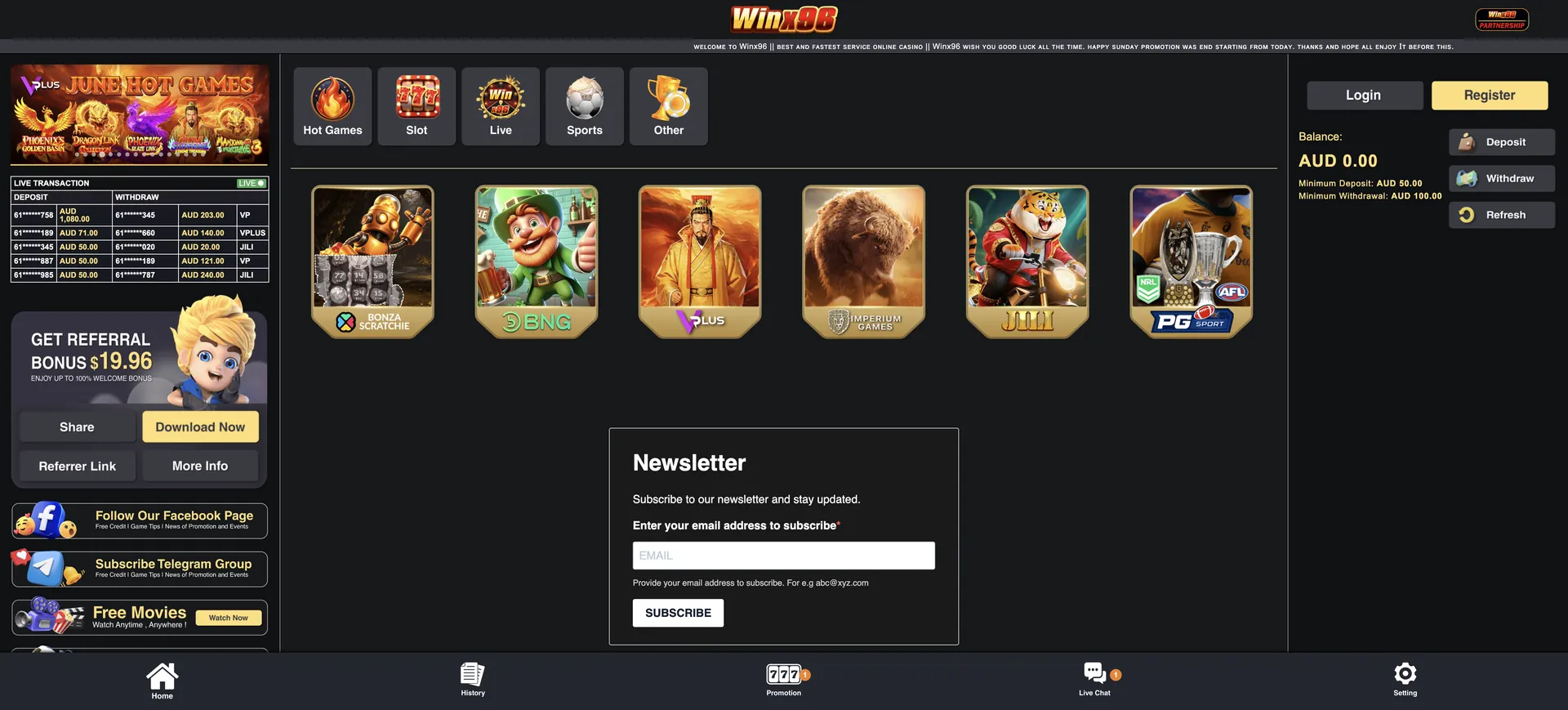
Players who prefer not to install anything get the same lobby, AUD cashier and bonuses in any mobile browser at winx96au.org.
This guide explains how the Winx96 app differs from a store app, how to install it on iPhone and Android, what works on mobile, how deposits and withdrawals behave on a phone, and how to keep the account secure when playing on the go.
| Feature | Winx96 PWA and mobile browser |
|---|---|
| App type | PWA installed from the website |
| App Store / Google Play | No store listing referenced on the site |
| iOS access | Safari (PWA via Add to Home Screen) or any browser |
| Android access | Chrome (PWA install) or any modern browser |
| Advertised extras | Push notifications, exclusive promos, 100% uptime |
| Game lobby | Hot Games, Slot, Live, Sports and Other - identical to desktop |
| AUD cashier | Deposit from AUD 50, withdraw from AUD 100 |
| Bonuses | Free credit, slot bonuses, quests and VIP Free rewards available |
| Sports | AFL and NRL markets via the Sports section |
| Support | 24/7 live chat from the bottom bar |
| Updates | Automatic - the PWA loads the current site version |
Is there a Winx96 casino app for Android or iOS?
Yes, in the form of a PWA. Winx96 does not reference a native app in the App Store or Google Play, but it offers an installable web app that behaves like one: it opens from a home screen icon, runs full-screen without the browser address bar, and can send push notifications about promotions.
For Australian players this is a practical advantage rather than a compromise. Casino domains change from time to time - Winx96 recently moved to winx96au.org - and a PWA keeps working without searching for the new address. It also takes almost no storage space and never needs a manual update, because it loads the live version of the site each time.
How to access Winx96 on mobile
Without installing anything, the casino runs in any modern mobile browser. The layout is mobile-first, with a bottom bar for Home, History, Promotion, Live Chat and Setting.
- Open Safari, Chrome or another browser on your phone.
- Go to winx96au.org or an official mirror (winx96.com, winx96.cc, winx96.io).
- Tap Login and enter your mobile number in 61 format and password, or tap Register to create an account.
- Use the category tiles to open pokies, live games or sports.
- Tap Deposit in the account panel to fund the AUD balance.
How to install the Winx96 app on your home screen
The PWA is installed from the browser in under a minute. On Android, the Download PWA App banner or the Download Now button usually triggers the install prompt directly; on iPhone, Apple requires the Share menu route through Safari.
iOS instructions (Safari)
On iPhone and iPad, the Winx96 app is added through Safari's share sheet and then opens full-screen like a native app.
- Open winx96au.org in Safari.
- Tap the Share icon (the square with an arrow pointing up).
- Scroll down and tap Add to Home Screen.
- Keep the name "Winx96" or rename it, then tap Add.
- Open the casino from the new icon and log in once.
Android instructions (Chrome)
On Android, Chrome supports PWA installation natively, so the Winx96 banner can install the app in one or two taps.
- Open winx96au.org in Chrome.
- Tap Download Now on the Download PWA App banner or in the referral block.
- Confirm Install in the Chrome prompt.
- If no prompt appears, open the Chrome menu (three dots) and choose Install app or Add to Home screen.
- Launch Winx96 from the home screen icon and log in.
Features available in the Winx96 app
The PWA loads the same platform as the desktop site, so there is no reduced mobile catalogue and no separate bonus list.
- Pokies: JILI, VPlus, BNG, Imperium Games, 918Kiss, ACE333 and other providers - see the Winx96 pokies page.
- Scratchies: the Bonza Scratchie tile with instant results.
- Live casino: dealer tables streamed to the phone.
- Sports: AFL, NRL and other markets from the same AUD balance.
- Promotions: AUD 19.96 free credit, 100% welcome bonus, daily and weekly quests, VIP Free rewards.
- Cashier: Deposit, Withdraw and Refresh buttons with AUD limits.
- History: transaction and game records.
- Extras: Free Movies and Live Sports streaming.
Winx96 app performance on mobile
Because the PWA and the browser version run on the same code, speed depends mainly on the device and the connection.
- Lobby: the provider-tile layout loads fewer images than long game lists, which keeps the home screen light on mobile data.
- Pokies: games from JILI, VPlus and BNG run in HTML5 in portrait or landscape without plugins.
- Live tables: streams adapt to connection quality; Wi-Fi or strong 4G/5G is recommended for live dealers.
- Cashier: the account panel and Refresh button update the AUD balance after a deposit without reloading the page.
- Notifications: the PWA can alert about new promotions, shown by the badge on the Promotion icon.
Mobile payments and withdrawals in AUD
The full cashier is available in the Winx96 app. Apple Pay and Google Pay are particularly convenient on phones, while withdrawals go to a bank account in the player's own name.
| Method group | Deposit | Withdrawal | Limit |
|---|---|---|---|
| Australian banks (NAB, CommBank, ANZ, Westpac, BOQ, Bank Australia, Virgin Money) | Yes | Yes, to own-name account | Deposit from AUD 50, withdrawal from AUD 100 |
| Apple Pay, Google Pay | Yes | No - payouts go to a bank account | Deposit from AUD 50 |
| Crypto (USDT, TRON, Bitcoin, Ethereum, USDC) | Yes | Confirm with live chat | Deposit from AUD 50 equivalent |
Withdrawal steps and the name-matching rule are explained on the Winx96 withdrawal page.
Security of the Winx96 app
A PWA uses the browser's own security model: the connection is encrypted, the app has no access to phone files or contacts, and it cannot be modified by third parties the way side-loaded APK files can. The main risks come from fake domains, so the app should only be installed from the official addresses listed by the casino.
Account verification is the same as on desktop. The username must be the player's full name, matching the bank account name, and the check usually applies at the first withdrawal. Support may request photo ID and a bank statement, which can be sent through the live chat attachment button directly from the phone.
Usage tips for Australian players
A few habits make the Winx96 app easier to use day to day.
- Install the PWA from winx96au.org to avoid searching for new domains later.
- Allow notifications if you want alerts for Lucky Saturday, quests and VIP Free days.
- Enter your mobile number in 61 format at login - autofill often adds 04 or +61.
- Use Apple Pay or Google Pay for quick deposits, but keep a bank account in your name for withdrawals.
- Use Wi-Fi for live tables and footy streams to save mobile data.
- Set personal deposit limits for yourself; if gambling stops being fun, call Gambling Help Online on 1800 858 858.
Winx96 app FAQ
Answers to common questions about playing Winx96 on a phone or tablet.
Is the Winx96 app in the App Store or Google Play?
No store listing is referenced on the site. The Winx96 app is a PWA installed from the casino website through the Download PWA App banner or the browser's Add to Home Screen option.
Is the Winx96 app free?
Yes. Installing the PWA costs nothing and uses very little storage.
Does the Winx96 app work on iPhone?
Yes. Open winx96au.org in Safari, tap Share and choose Add to Home Screen.
Are bonuses available in the Winx96 app?
Yes. The AUD 19.96 free credit, the 100% welcome bonus, daily and weekly quests and VIP Free rewards are all claimed from the Promotion tab.
Can I withdraw through the Winx96 app?
Yes. Tap Withdraw in the account panel. The minimum is AUD 100 and the payout goes to a bank account in your own name.
What if the Winx96 app stops loading?
Check your connection, then try an official mirror (winx96.com, winx96.cc, winx96.io) in the browser and reinstall the PWA from the working address.
Do I need a separate account for the app?
No. The same login works in the app, in mobile browsers and on desktop. More sign-in tips are on the Winx96 login page.
Updated on 2 November 2026.